How to Use Naver Map in Korea: A Beginner-Friendly Guide for Foreign Travelers
If you are planning your first trip to Korea, learning how to use Naver Map in Korea is one of the most useful things you can do before you arrive. Many visitors arrive in Seoul expecting to use Google Maps the same way they do in other countries, but Korea is a little different.
Google Maps can still be useful for checking general locations, reading some reviews, or saving places before your trip. However, for everyday navigation inside Korea, many travelers find that Naver Map is more practical.
Naver Map is widely used in Korea for finding restaurants, cafés, subway routes, bus stops, walking directions, opening hours, photos, reviews, and Korean addresses. For foreign travelers, it can help with everyday situations such as finding the correct subway exit, checking how far a restaurant is from your hotel, showing your taxi driver the destination, or saving places before a busy sightseeing day.
You may also see travelers refer to the app as “Naver Maps.” In this guide, we use “Naver Map” for consistency, but both names refer to the same app.
This guide explains how to use Naver Map in Korea step by step, especially if you do not speak Korean. The exact app layout may vary depending on your phone, region, language settings, and app version, so always check the latest app interface before your trip.
Tested and captured by H. Jung in Seoul
The Naver Map screenshots in this guide were captured directly while testing the app in Korea. I checked the English settings, place search, public transportation routes, walking directions, saved places, and Korean address display.
Last checked: July 2026
Device used for testing: Android
Table of Contents
Why Naver Map Is Important for Traveling in Korea
When traveling in Korea, accurate navigation matters more than you might expect.
Seoul is easy to explore once you understand the subway system, but the city can feel confusing at first. Many subway stations have multiple exits, underground shopping areas, nearby bus stops, and streets that look similar. A restaurant might be only five minutes away, but choosing the wrong subway exit can turn that into a much longer walk.
Naver Map helps travelers with many practical tasks, including:
Finding restaurants, cafés, shops, hotels, attractions, and subway stations.
Checking public transportation routes by subway and bus.
Seeing estimated travel time and transfer information.
Finding the nearest subway exit or bus stop.
Checking walking routes from a station to your final destination.
Saving places into travel lists.
Copying or showing Korean addresses for taxis.
Opening Naver Map links from Korean blogs, restaurant pages, and travel guides.
For example, if you are going from Myeongdong Station to Bukchon Hanok Village, Naver Map can help you compare subway, bus, taxi, and walking options. If you are looking for a café in Seongsu, it can show nearby cafés, photos, business hours, and location details. If you are visiting a restaurant in Hongdae, Naver Map can help you check whether it is closer to Hongik University Station Exit 8 or Exit 9.
In short, Naver Map is not just a map. For many travelers, it becomes a daily Korea travel tool.
Naver Map vs Google Maps in Korea
Many foreign travelers ask the same question before visiting Korea:
“Can I just use Google Maps in Korea?”
The answer is: you can use Google Maps for some things, but you should not rely on it as your only navigation app.
Google Maps may still be helpful for checking general locations, reading some international reviews, saving places before your trip, or getting a rough idea of where an area is. However, in Korea, Google Maps has historically been less reliable for detailed walking and driving navigation compared with local Korean map apps.
This situation may change over time, so it is best to check the latest app functionality before your trip.
For practical travel in Seoul, many visitors use this approach:
Use Google Maps when researching places before the trip.
Use Naver Map when actually moving around Korea.
Use Papago or another translation app when Korean place names, reviews, or menus are confusing.
Naver Map usually has stronger local data for Korea, especially for restaurants, cafés, public transportation, building names, subway exits, and Korean-language addresses. This is why many English-speaking travelers install Naver Map even if they normally prefer Google Maps.
How to Download Naver Map
You can download Naver Map from the app store on your phone.
For iPhone, go to the Apple App Store and search for:
NAVER Maps, Navigation
For Android, go to the Google Play Store and search for:
NAVER Maps, Navigation
After installing the app, allow location access when you want to use real-time navigation. Some permissions may be optional, and the required permissions can vary depending on your phone and app version.
Before your trip, it is a good idea to open the app once and test it from home. Search for places such as:
Incheon International Airport
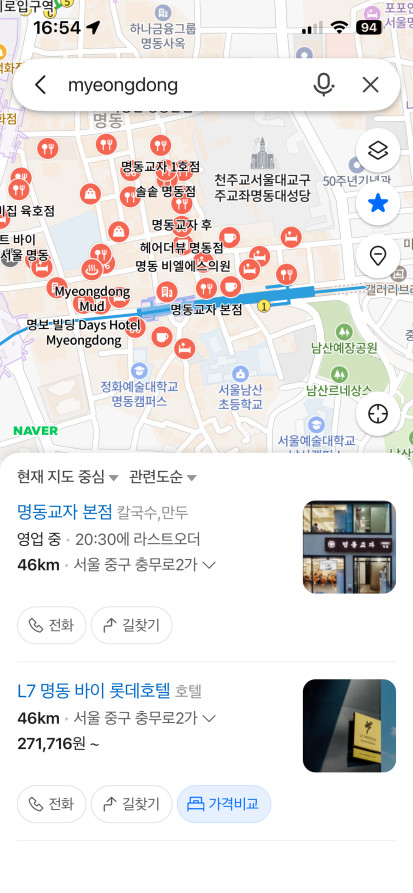
Myeongdong Station
Gyeongbokgung Palace
Hongik University Station
Seoul Station
This helps you become familiar with the search bar, map view, route button, and saved places before you actually need them in Korea.
Can You Use Naver Map in English?
Yes, Naver Map can support English, but the experience may not be 100% English in every situation.
Some menus, map labels, place names, reviews, or business information may still appear in Korean depending on the location, listing, and app version. Popular tourist areas are usually easier to use in English than smaller local neighborhoods.
For example, searching for Gyeongbokgung Palace or Myeongdong Station is usually easier than searching for a small local restaurant that only has a Korean name.
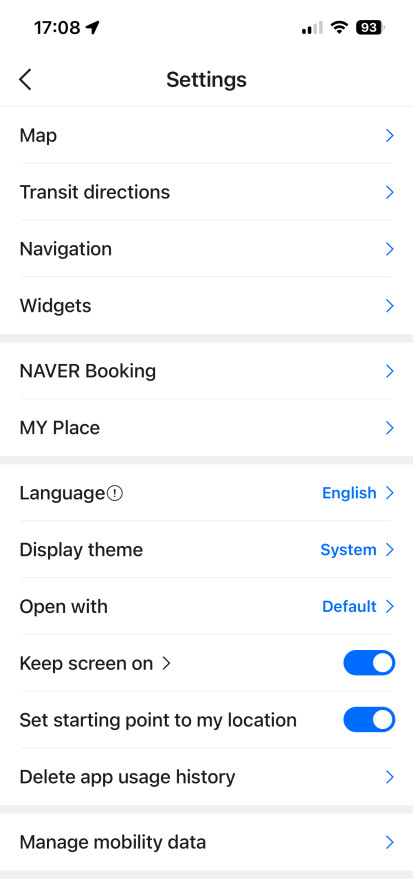
How to Change Naver Map to English
On Android:
Open Naver Map, tap the MY profile icon beside the search bar, tap the Settings gear icon, select Language, and choose English.
On iPhone:
Open Naver Map, go to MY → Settings → Language. You may be redirected to iPhone Settings → NAVER Map → Preferred Language, where you can select English.
Tips for Using Naver Map in English
Search in English first.
Start with the English name of the place, such as “Gyeongbokgung Palace,” “Seoul Station,” or “Myeongdong.”
Use the Korean name if English search does not work.
Some restaurants, cafés, and local shops may be easier to find with their Korean name.
Copy and paste the Korean address.
If you find a place on Instagram, a Korean blog, or a restaurant website, copy the Korean address and paste it into Naver Map.
Use Papago or another translation app.
Translation apps are helpful when reviews, menus, categories, or business information appear in Korean.
Check photos and location carefully.
Even if you cannot read every detail, photos, nearby landmarks, and the map position can help confirm whether you found the right place.
How to Search for Places, Restaurants, and Cafés on Naver Map
Naver Map can be used to search for restaurants, cafés, tourist attractions, subway stations, hotels, shops, and other places throughout Korea. Major attractions and well-known businesses are often searchable in English, but smaller restaurants and specific branches may be easier to find using their Korean names.
Start with the English Name
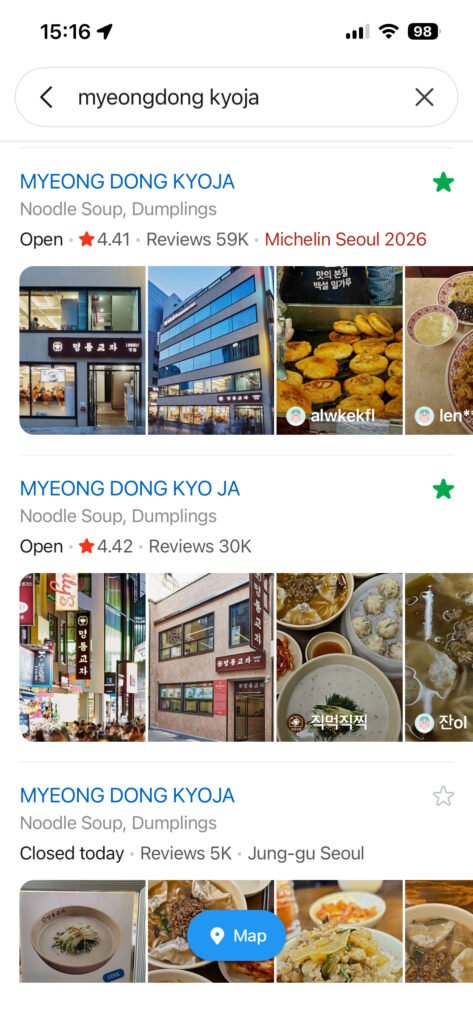
First, enter the English name of the place into the search bar.
For example:
- Myeongdong Kyoja
- Gyeongbokgung Palace
- Seoul Station
- Gwangjang Market
English searches usually work well for major stations, attractions, hotels, and internationally known restaurants.
In my everyday use of Naver Map in Korea, English searches are often enough for well-known destinations. However, smaller restaurants, cafés, and businesses with several branches may not appear correctly under their English names.
Search Again Using the Korean Name
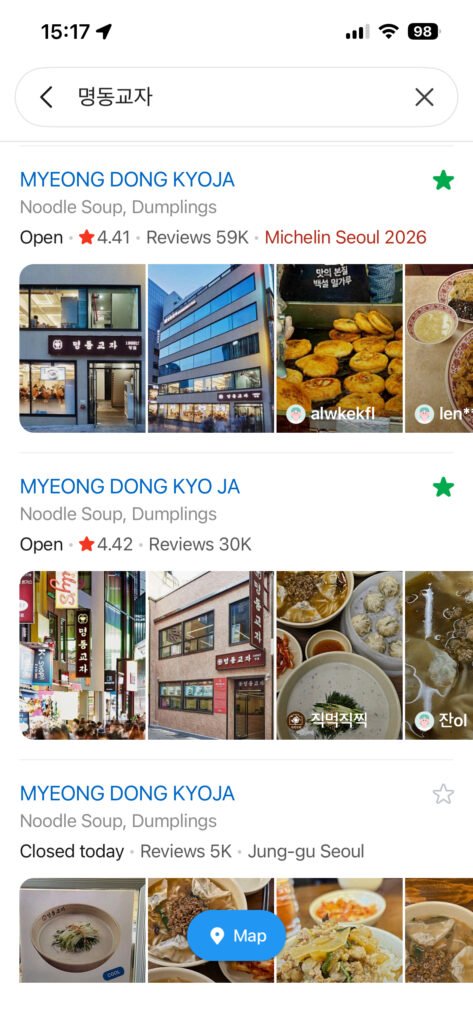
If the English search produces no results or shows the wrong branch, copy the Korean name from a restaurant guide, booking page, hotel staff, or official listing and paste it into Naver Map.
For example:
- Myeongdong Kyoja — 명동교자
Searching for 명동교자 may produce more accurate branch information than searching only for the English name.
This is especially helpful when:
- Several branches have similar English names
- The business does not use an official English name
- The spelling varies across travel websites
- The restaurant is located inside a market, department store, or shopping mall
Search by Food Type and Neighborhood
You can also combine a food or place category with a neighborhood name.
Useful examples include:
- Hongdae Korean BBQ — 홍대 고기집
- Myeongdong kalguksu — 명동 칼국수
- Seongsu cafe — 성수 카페
- Gyeongbokgung restaurant — 경복궁 맛집
Korean searches may provide a wider range of local results. The word 맛집 is commonly used for popular or recommended places to eat, while 카페 means café and 고기집 generally refers to a grilled-meat restaurant.
Do not choose a restaurant only because it appears near the top of the results. Compare several listings and check whether the information matches your itinerary and dining preferences.
After finding a restaurant, our How to Order Food in Korea guide explains menus, kiosks, and payment.
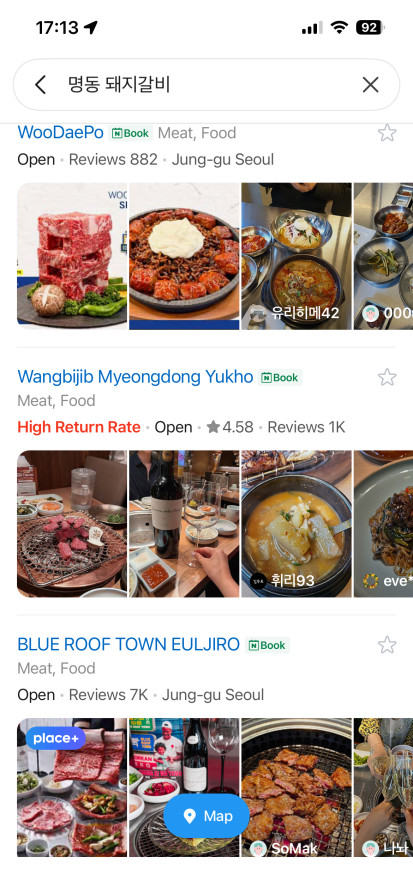
Confirm the Exact Branch
Many Korean restaurant and café brands operate several branches. Before selecting a result, check:
- The neighborhood
- The nearest subway station
- The Korean address
- Recent exterior photos
- The floor or building name
- Walking distance from your current location
- Recent opening hours
I normally compare the Korean address, nearest station, and recent storefront photos before choosing a branch. This helps avoid traveling to a location with a similar name in a different neighborhood.
Check the Restaurant Details Before Visiting
Open the place page and review the available information, including:
- Current opening hours
- Break time
- Last order time
- Regular closing days
- Menu and price photos
- Recent visitor photos
- Reviews
- Takeout or reservation information
- Exact location inside the building
For restaurants, I personally pay particular attention to the branch name, break time, last order, recent menu photos, and exterior photos. These details are often more useful than relying only on the overall review score.
Restaurant hours, prices, menus, and reservation policies can change, so check the most recent information before traveling across Seoul for a specific place.
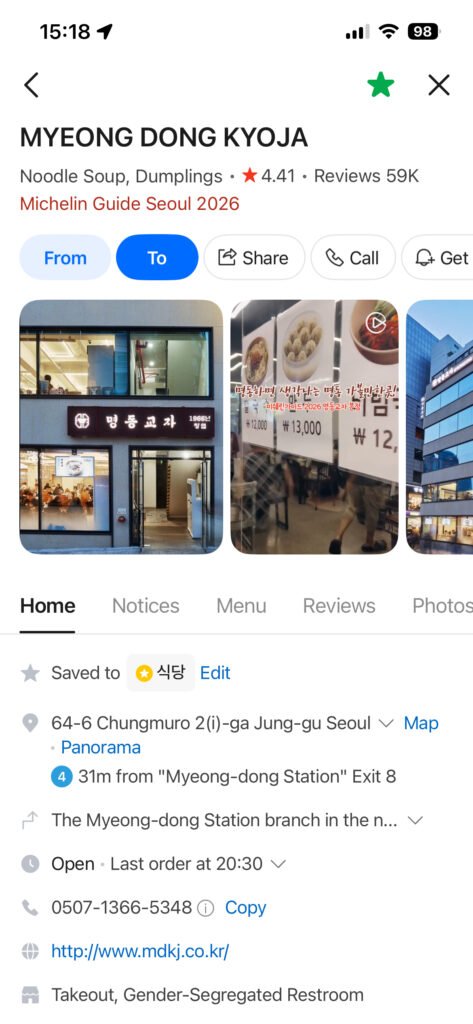
Save a Backup Option
When visiting a busy neighborhood such as Myeongdong, Hongdae, Seongsu, or Ikseondong, save one nearby backup restaurant or café as well.
A restaurant may be:
- Temporarily closed
- Fully booked
- Sold out of a popular menu
- Operating with a long wait
- Between lunch and dinner service
Having a second saved option can prevent you from wasting time searching again while already hungry or tired.
How to Use Public Transportation Directions
Seoul has one of the most convenient public transportation systems in the world, but it can feel overwhelming on your first day.
Naver Map can help you decide whether to take the subway, bus, or a combination of both.
Step-by-Step: Public Transportation Route
Search for your destination.
Tap the directions or route button.
Set your starting point.
Choose the public transportation option.
Compare the suggested routes.
Check the subway line, bus number, transfer station, and estimated travel time.
Look carefully at the recommended station exit.
Depending on the app version, Naver Map may show different route options such as fastest route, fewer transfers, less walking, or bus-heavy routes. The exact labels may vary, but the goal is the same: choose the route that is easiest for your situation.
Before using Seoul’s subway and buses, read our T-Money Card Guide for First-Time Visitors to Korea.
Example: Myeongdong to Gyeongbokgung Palace
If you are staying near Myeongdong and want to visit Gyeongbokgung Palace, Naver Map may suggest a subway route, bus route, or mixed route depending on your exact starting point.
Before leaving, check:
Which subway line to take.
Where to transfer, if needed.
Which exit to use at the final station.
How many minutes you need to walk after exiting the station.
For first-time visitors, the route with the fewest transfers may be better than the absolute fastest route. Saving three minutes is not worth getting lost during a complicated transfer.
Subway Exits Matter in Seoul
This is one of the biggest tips for using Naver Map in Korea:
Always check the subway exit number.
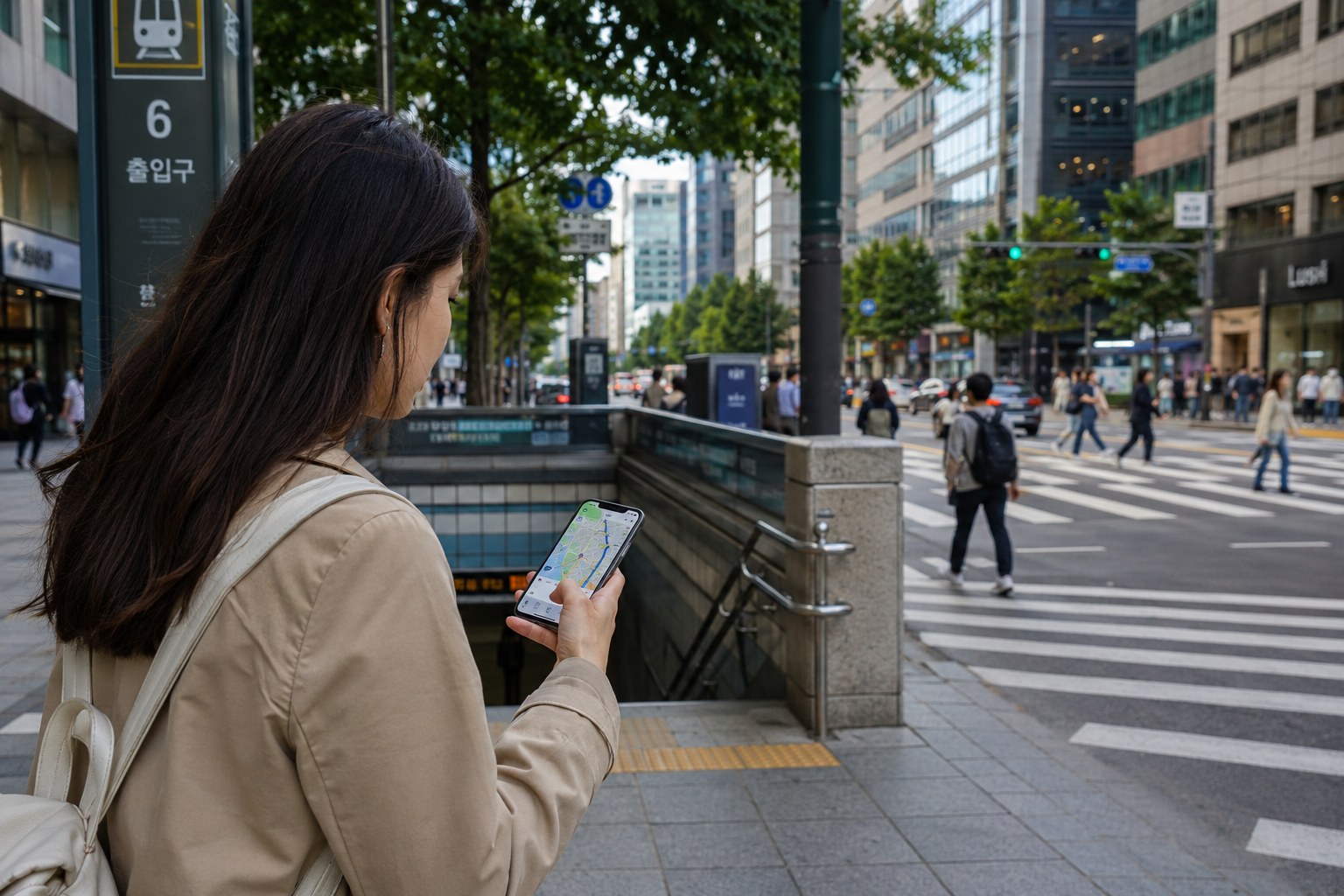
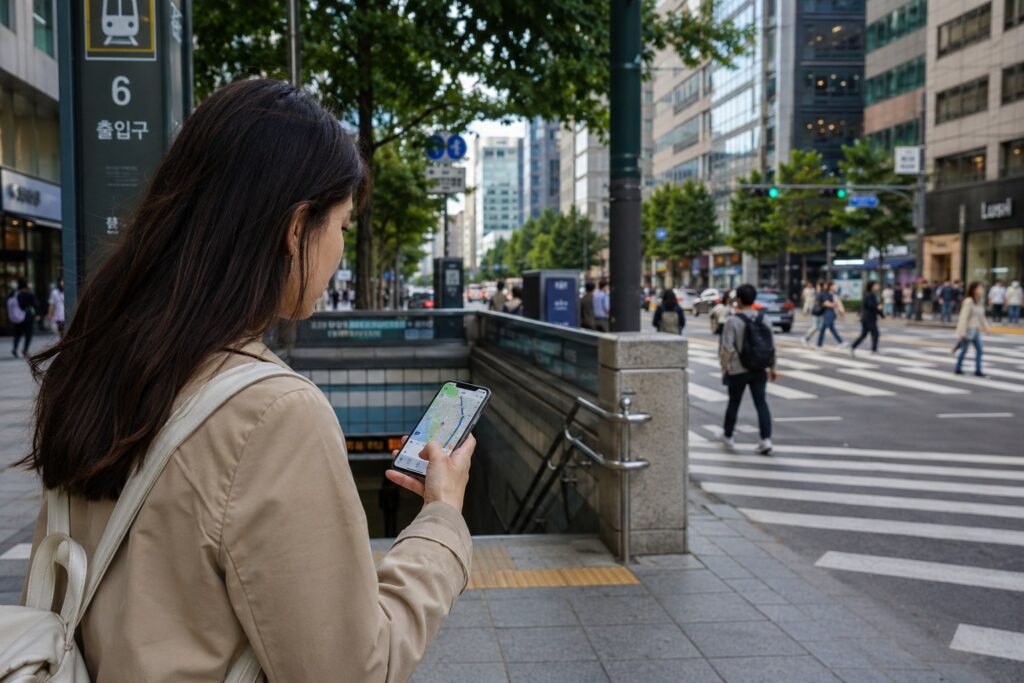
Large stations such as Seoul Station, Gangnam Station, Hongik University Station, and Express Bus Terminal Station can have many exits. If you use the wrong exit, you may have to cross wide roads, walk through underground malls, or go around large buildings.
When Naver Map shows an exit number, follow it carefully. You can also take a screenshot of the route before going underground, in case your mobile signal becomes weak.
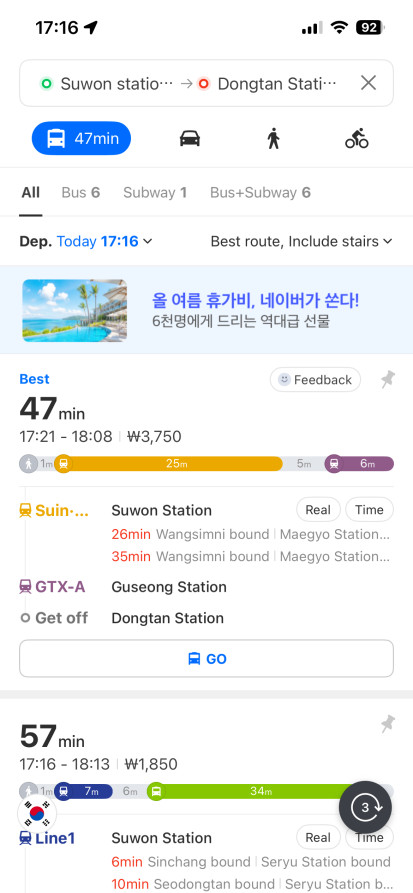
How to Use Walking Directions
Walking directions are useful after you exit a subway station, leave a bus stop, or explore neighborhoods such as Ikseon-dong, Seongsu, Yeonnam-dong, Bukchon, or Mangwon.
Step-by-Step: Walking Route
Search for your destination.
Tap directions.
Select your current location as the starting point.
Choose the walking option.
Follow the route on the map.
Check nearby landmarks, alleys, and building entrances.
In Seoul, the entrance to a restaurant or café may not always face the main road. Some places are on the second floor, in a basement, inside a shopping complex, or hidden in a small alley.
Walking directions can get you close, but you should still check the building name, floor number, and photos.
Useful Walking Tip
When you are close to your destination, zoom in on the map and compare it with your surroundings.
Look for:
Building name.
Floor number.
Nearby convenience store.
Café or restaurant sign.
Subway exit number.
Main road vs side street.
Entrance location.
If the location feels slightly off, check the listing photos. Many Korean map listings include exterior photos, which can help you recognize the storefront.
How to Check Your Destination Before Taking a Taxi
Even if you do not use Naver Map for every route, it is very useful before taking a taxi.
Many taxi drivers in Korea use Korean navigation apps. If your destination has only an English name, the driver may not immediately recognize it. Showing the Korean name or address on Naver Map can make the ride much smoother.
Before getting in a taxi, open the destination page on Naver Map and check:
Korean place name.
Korean address.
Nearby landmark.
Correct branch.
Map location.
Estimated driving distance or route.
This is especially important for places with multiple branches. For example, a restaurant may have locations in Gangnam, Hongdae, Seongsu, and Myeongdong. If you only say the restaurant name, the driver may need more information.
For app booking, payment, and foreigner-friendly options, see our guide to the best taxi apps in Korea.
Simple Taxi Phrase
You can show the driver the Naver Map screen and say:
“Yeogi-ro gajuseyo.”
This means:
“Please go here.”
You do not need perfect Korean pronunciation if you show the map clearly. The Korean address on the screen is often the most important part.
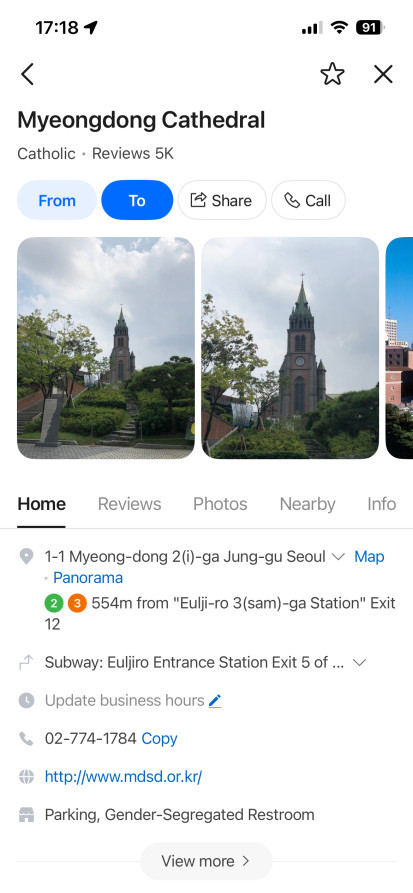
How to Save Places for Your Korea Trip
Saving places is one of the best ways to use Naver Map before and during your trip.
Instead of searching again every day, you can create a list of restaurants, cafés, attractions, shops, and hotels.
Important: You need to be signed in to a NAVER account to save places, routes, bus stops, and subway information. If you plan to organize your trip with saved lists, create or check your account before arriving in Korea.
What to Save Before Your Trip
You can save places such as:
Hotel.
Airport bus stop.
Subway stations near your hotel.
Restaurants you want to try.
Cafés by neighborhood.
Palaces and museums.
Shopping areas.
Clinics or pharmacies near your hotel.
Backup restaurants in case your first choice is closed.
For example, you could create a Seoul food list with:
Korean BBQ in Hongdae.
Café in Seongsu.
Gwangjang Market food stalls.
Brunch café in Itaewon.
Traditional tea house near Insadong.
Late-night restaurant near your hotel.
Why Saved Places Are Useful
Saved places help you plan your route by neighborhood.
If you are spending the afternoon in Seongsu, open your saved places and see which cafés, shops, and restaurants are nearby. This prevents unnecessary travel across the city.
A good Seoul itinerary is usually area-based. Instead of visiting Hongdae, Gangnam, Bukchon, and Seongsu all in one day, group nearby places together. Naver Map makes this easier because you can see your saved places on the map.
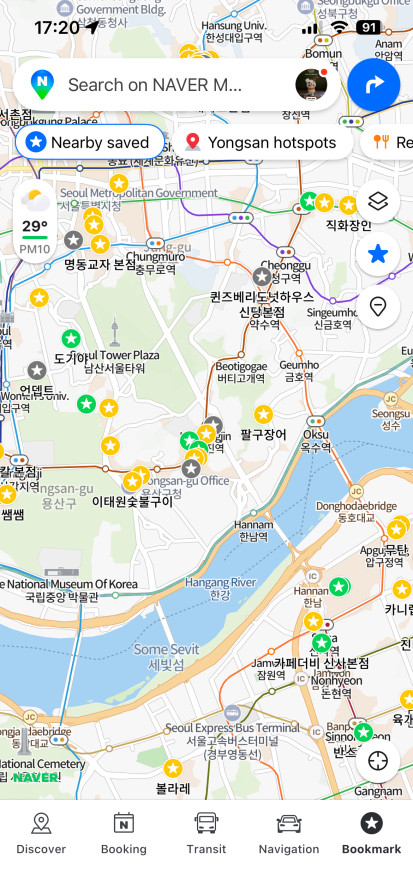
How to Use Korean Addresses and Naver Map Links
When reading Korean blogs, restaurant websites, Instagram posts, or Seoul Plate guides, you may see Korean addresses or Naver Map links. These are very useful.
Tip 1: Copy and Paste Korean Addresses
If a place does not appear when you search in English, copy the Korean address and paste it into Naver Map.
A Korean address may look like this:
서울특별시 중구 명동길 14
You do not need to understand every word. Just copy the full address and search it in Naver Map.
Tip 2: Use the Korean Place Name
Korean restaurant names can be difficult to romanize. The same name may appear in different English spellings. If you copy the Korean name directly, you are more likely to find the correct listing.
Here are some useful examples:
Myeongdong = 명동
Hongdae / Hongik University area = 홍대 / 홍대입구
Seongsu = 성수
Ikseon-dong = 익선동
Gyeongbokgung = 경복궁
Gangnam = 강남
Tip 3: Open Naver Map Links from Blogs
Some Korean blogs and travel sites include Naver Map links. If you tap a Naver Map link on your phone, it may open directly in the app or in a browser, depending on your settings.
When a Naver Map link opens:
Check the place name.
Check the address.
Tap directions.
Choose public transportation, walking, or driving/taxi route.
Save the place if you want to visit later.
For Seoul Plate articles, adding Naver Map links can be very helpful for readers because it lets them move directly from the blog post to practical navigation.
Common Mistakes First-Time Travelers Make
Mistake 1: Using Only Google Maps
Google Maps may be familiar, but it may not always give the best local navigation experience in Korea. Install Naver Map before your trip so you are not learning it for the first time while standing outside a busy subway station.
Mistake 2: Searching Only in English
Many famous places can be found in English, but smaller restaurants and cafés may be easier to find in Korean. If English search fails, copy the Korean name or address.
Mistake 3: Ignoring Subway Exits
In Seoul, the correct subway exit can save a lot of time. Always check the exit number before you leave the station.
Mistake 4: Not Checking Business Hours
Restaurant and café hours can change. Some places have break time, closed days, or last order times. Always check the latest information before making a long trip.
Mistake 5: Choosing the Fastest Route Without Thinking
The fastest route may include complicated transfers or more walking. If you are new to Seoul, the easiest route may be better.
Mistake 6: Not Checking the Branch
Many Korean cafés and restaurants have multiple branches. Always check the neighborhood and address before you start moving.
Mistake 7: Forgetting to Save Backup Places
Popular restaurants may have long waits. Save backup cafés and restaurants nearby, especially in areas like Seongsu, Hongdae, Myeongdong, and Ikseon-dong.
Suggested Seoul Travel Workflow Using Naver Map
Here is a simple workflow for first-time visitors.
Before Your Trip
Download Naver Map.
Search for your hotel.
Save your hotel.
Save major attractions.
Save restaurants and cafés by neighborhood.
Copy Korean names or addresses for hard-to-find places.
Test a few routes, such as airport to hotel or hotel to Myeongdong.
During Your Trip
Use Naver Map each morning to check routes.
Screenshot important routes before entering subway stations.
Check the correct subway exit.
Use walking directions after leaving the station.
Show Korean addresses to taxi drivers when needed.
Save backup restaurants nearby.
Recheck hours before visiting popular places.
After Your Trip
If you plan to revisit Korea, keep your saved places organized. You can separate lists by city or theme, such as Seoul cafés, Busan restaurants, Jeju places, or Korea shopping spots.
FAQ
Do I need Naver Map in Korea?
Yes, it is highly recommended. You can still use Google Maps for general research, but Naver Map is often more useful for local navigation, public transportation, walking routes, Korean addresses, restaurants, cafés, and subway exits in Korea.
Is Naver Navigation the Same as Naver Map?
Yes. The official English app listing is “NAVER Maps, Navigation.” It is the same app covered in this guide, combining local place search with public transportation, walking directions, saved places, and navigation features. The exact interface and available features may vary depending on your device, language settings, and app version.
Is Naver Map available in English?
Naver Map can support English, but not every part of the app or every place listing will always appear in English. Some restaurant names, reviews, addresses, or local details may still be in Korean depending on the listing and app version.
Why is Google Maps different in Korea?
Google Maps has historically had limited functionality in Korea compared with many other countries. The situation may change over time, so check the latest Google Maps features before your trip. However, many travelers still use Korean map apps such as Naver Map for more detailed local navigation.
Can I use Naver Map without knowing Korean?
Yes. You can search major attractions and stations in English, copy and paste Korean addresses, use translation apps, and rely on map pins, photos, subway exits, and route details. Learning a few Korean place words like 맛집, 카페, 역, and 출구 can also help.
How do I find restaurants on Naver Map?
Search by restaurant name, food type, area, or Korean keyword. For example, you can search “Korean BBQ Hongdae,” “cafe Seongsu,” “Myeongdong restaurant,” or Korean terms such as “성수 카페” and “명동 맛집.”
Can I use Naver Map for subway and bus directions?
Yes. Naver Map can help you compare public transportation routes, including subway and bus options. It may show estimated travel time, transfer points, nearby stations, and exits. The exact interface may vary depending on app version.
Should I use Naver Map or Kakao Map?
Both are popular Korean map apps. Many travelers find Naver Map convenient because of its local search results, saved places, and tourist-friendly features. Kakao Map can also be useful, especially if you use other Kakao services. For a first-time visitor, Naver Map is a good place to start.
Do I Need a NAVER Account to Use Saved Places?
Yes. A NAVER account is required to save places, routes, and public transportation information. It is a good idea to sign in and test the saving feature before your trip.
How This Guide Was Checked
This guide was prepared and tested by H. Jung, the Korea-based editor of Seoul Plate. The app screenshots were captured directly in Korea, while the official app name, language support, and settings instructions were cross-checked using NAVER’s official help pages and app listings. Interface details may change after future updates.